
BOE, Social Security and Procuradores, in one search. Compare on the map and review the details before you bid.
Searching should take less effort
A home on BOE. A vehicle on Social Security. Another auction on Procuradores. Finding what interests you is only the beginning.
Too many tabs
Each source has its own search. Repeating filters and checking results across several sites makes comparison harder.
You repeat the same search
Missing context
Location, auction value, dates and documents: you need to bring each asset’s details together to assess whether it interests you.
It’s harder to compare with confidence
Deadlines don’t wait
Auctions have deadlines and their status can change. Checking each one again adds another task to your search.
You could arrive too late
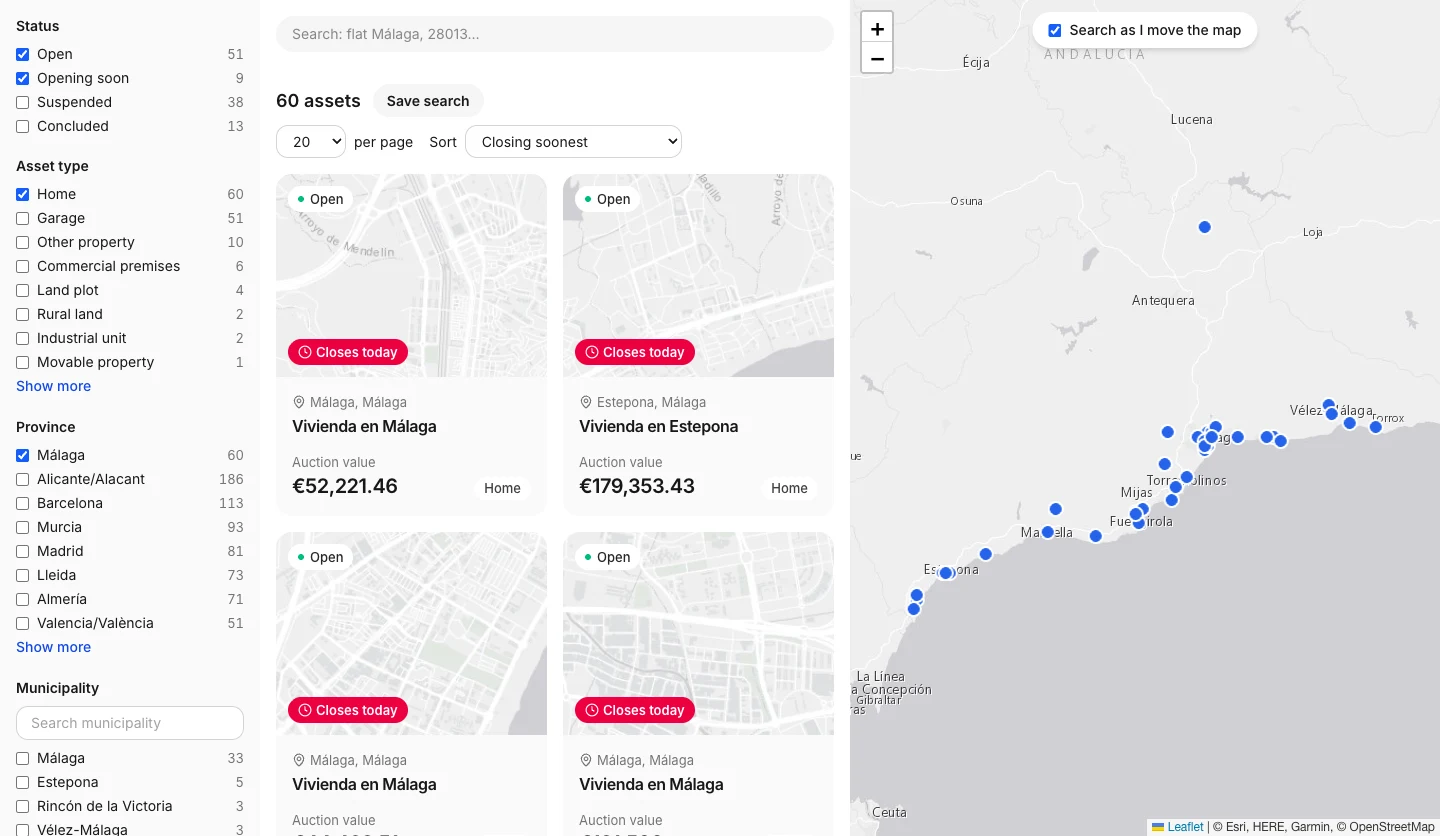
One search, three sources
We bring together BOE, Social Security and Procuradores so you can compare assets by area, type and auction value. Each dot on the map represents an approximate location in the active catalogue.
2,664active assets
Open on the map1,371 places · 441 assets published this week
From search to decision
Compare your options, understand what is up for auction and follow the assets that interest you before taking the next step.
First auction? Read the guidesFind what suits you
Choose a province, asset type and auction value. Compare what suits you on the map without switching between portals.
Explore the mapReview the details
Open an asset page and use your free account to check its address, charges, occupancy status, deposit and documents where available.
Create a free accountFollow your favourites
Save favourites and searches with your account. Enable notifications to follow changes, closing dates and new assets that match your search.
Save my searchesBid on the official site
When you decide to take part, follow the asset page’s link to the official source. Check the conditions there and place your bid on that portal.
Prepare for my first bid
Why choose Subastic
For people who want to compare before deciding and know where the information comes from.
- Know where the information comes from
Each asset identifies its source. With your account you can check the official link and available documents to verify the information.
See our sources- Start for free
Search without registering. A free account adds the available details and tools to follow your favourite assets.
Create a free account- You decide the next step
Subastic helps you find and compare. Participation and bidding take place on each auction’s official portal.
Prepare with our guides
More with your free account
Review the available details, organise your favourites and enable notifications from your phone or browser.
- Exact address and location on the map
- Catastro (land registry) data: floor area, year and use
- Charges and occupancy status
- Notices, documents and a link to the official auction
- Favourites and saved searches
- Notifications of changes, closing dates and new assets
Asset details are shown where available from the source.
Create a free accountTap or hover over the listing to see it as a member
What is Subastic?
It is a search tool that brings together assets from BOE, Social Security and Procuradores public auctions. Filter by type, location and auction value, and compare them on a map.
Do I need an account?
You can search and view public information without registering. A free account gives you access to the exact address, charges, occupancy status, deposit and documents where available, and lets you save favourites and searches.
Do I bid on Subastic?
No. With your account, follow the asset page’s link to the official source. You check the participation requirements and place your bid there. Subastic does not run the auctions.
What does auction value mean?
It is the reference value set by the managing authority for the lot, rather than the final winning price. Assets in the same lot show the same value, and bids are placed for the whole lot.
How do I receive notifications?
Save an asset as a favourite or save a search with your account, then enable notifications in the app’s settings. You also need to allow them in your browser or device. Choose notifications for status changes, closing dates and new assets matching your searches.
Can I use it on my phone?
Yes. The website works on mobile, and you can install the Subastic app from your browser. Sign in to keep your favourites, searches and settings with you.
Your firm, on every asset page in your province
A single advertiser per province and direct enquiries from people already weighing up a bid. No fee per enquiry.
Book my province- Provincial exclusivity
- Contact form on every listing
- Your logo, services and phone number on display
Learn before you bid
See all guides #guides
· 22min
55 questions about Spanish public auctions: a practical bidding guide
Answers to 55 questions about judicial, Tax Agency and Social Security auctions: charges, deposits, occupants, taxes and the 2025 reform.
 #news
· 3min
eactivos auctions are now on Subastic
We have added eactivos auctions to Subastic. Search assets by province, type and value alongside BOE, Social Security and Procuradores auctions.
 #news
· 3min
Subastic adds Procuradores auctions
We are integrating Subastas Procuradores alongside BOE and Social Security: more assets to explore by province, type and value in one search.
Find your asset type
See all assets


Auctions closing soon
See open auctionsOrorbia, Navarra
Subasta Inmueble (Garaje) en Ororbia, Navarra
BOE
Auction value
€19,606.03
Garage
Ororbia, Navarra
Subasta Inmueble (Garaje) en Ororbia, Navarra
BOE
Auction value
€19,260.61
Garage
Ororbia, Navarra
Subasta Inmueble (Garaje) en Ororbia, Navarra
BOE
Auction value
€20,889.82
Garage
Ororbia, Navarra
Subasta Inmueble (Garaje) en Ororbia, Navarra
BOE
Auction value
€18,771.55
Garage
 OpenCloses today
Mislata, Valencia/València
Subasta Otros (Derechos/Otros) en Mislata, Valencia/València
eactivos
Auction value
€23,369
Rights/Other
 OpenCloses today
Valencia, Valencia/València
Subasta Mueble en Valencia, Valencia/València
eactivos
Auction value
€425
Movable property
La Salzadella, Castellón/Castelló
Subasta Inmueble (Vivienda) en La Salzadella, Castellón/Castelló
BOE
Auction value
Not stated
Home
Pilar de la Horadada, Alicante/Alacant
Subasta Inmueble (Vivienda) en Pilar de la Horadada, Alicante/Alacant
BOE
Auction value
€199,080
Home
Explore by location


- A Coruña47
- Albacete23
- Alicante/Alacant359
- Almería89
- Araba/Álava7
- Asturias34
- Ávila3
- Badajoz39
- Barcelona247
- Bizkaia99
- Burgos3
- Cáceres3
- Cádiz74
- Cantabria30
- Castellón/Castelló58
- Ceuta6
- Ciudad Real54
- Córdoba38
- Cuenca10
- España50
- Gipuzkoa11
- Girona104
- Granada60
- Guadalajara11
- Huelva22
- Huesca22
- Illes Balears33
- Jaén24
- La Rioja12
- Las Palmas42
- León21
- Lleida83
- Lugo9
- Madrid162
- Málaga67
- Melilla3
- Murcia154
- Navarra23
- Ourense10
- Palencia5
- Pontevedra32
- Salamanca4
- Santa Cruz de Tenerife70
- Segovia5
- Sevilla85
- Soria4
- Tarragona81
- Teruel5
- Toledo66
- Valencia/València124
- Valladolid14
- Zamora6
- Zaragoza32
Auctions by city
Browse assets up for auction in each city. Province pages also include the other municipalities.
2,679 assets up for auction
Explore the map or create your account to see every detail of each listing.